Pi from Pie
Background
It is perhaps surprising that it is possible to estimate the mathematical constant π without resorting to any techniques or operations more sophisticated than counting, adding, and multiplication. This problem asks you to write two functions that estimate π. (3.14159…) by dart-throwing.
The basic idea
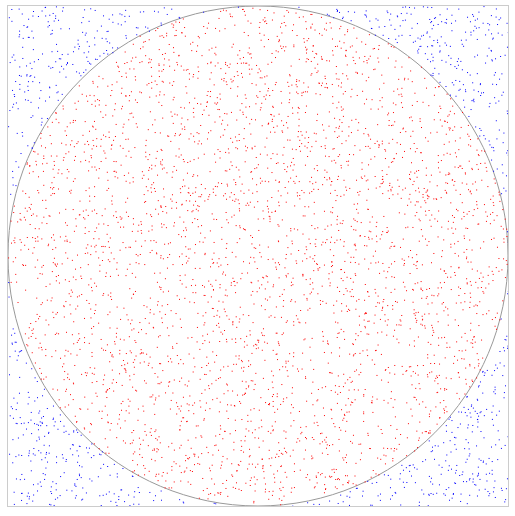
Imagine a circle inscribed within a square that spans the area where -1 <= x <= 1 and -1 <= y <= 1. The area of the inscribed circle, whose radius is 1.0 would be π.

If you were to throw darts at random locations in the square, only some of them would hit the circle inscribed within it.
The ratio
area of the circle / area of the square
can be estimated by the ratio
number of darts that hit the circle / total number of darts thrown
or in this case,
number of red darts / number of blue darts
As the number of darts increases the ratio above, gets closer and closer to the first ratio. Since three of the four quantities involved are known, they can be used to approximate the area of the circle - this in turn can be used to approximate π.
Functions to write
For this problem, you will write two functions (each based on loops) that use different tests for determining how many random darts to throw: for_pi(n) and while_pi(error).
The for_pi(n) function takes in a positive integer n and should “throw” n darts at the square. Each time a dart is thrown, the function should print
- the number of darts thrown so far
- the number of darts thrown so far that have hit the circle
- the resulting estimate of π
After n throws, the final resulting estimate of π should be returned.
The while_pi(error) function, on the other hand, will take in a positive floating-point value, error, and should then continue to throw darts at the dartboard (the square) until the resulting estimate of π is closer to the correct value than error. As with the for_pi function, this function should print
- the number of darts thrown so far
- the number of darts thrown so far that have hit the circle
- the resulting estimate of π
after each dart throw it makes. Also, it should return the number of darts thrown in order to reach the input accuracy.
Note that the while_pi function requires the actual, known value of π in order to determine whether or not its estimate is within the error range. Although this would not be available for estimating an unknown constant, you may include the line
import math
in your code and then use the value of math.pi as the actual value of π.
Design, or to throw darts at Python.
This problem allows for any design of the dart-throwing simulation that you would like to use – as long as it is loop-based and not recursion-based (simply for the practice).
To throw a dart, you will want to generate random x and y coordinates between -1.0 and 1.0. Be sure to include the line
import random
near the top of your file. When you do this, you will now be able to use the function
random.uniform( -1.0, 1.0 )
that will return a floating-point value that is in the range from -1.0 to 1.0
You may want a helper function that
- throws one dart (getting a random
xand a randomycoordinate between-1and1 - determines whether that dart is within the circle of radius
1centered at the origin (you may notice that you don’t have to even use themath.sqrtfunction in order to check this!) - returns
Trueif the dart hits andFalseif the dart misses
Such a helper function would help in both cases: for_pi and while_pi.
However you design your simulation, you should be sure to include an explanatory docstring for each of your functions. In addition, if there are any parts of your code that warrant additional commenting, you should use the in-line comments that begin with #.
Examples
Here is an example run from each of the two functions – since there are random numbers involved, they are here to give a sense of one appropriate way to handle the output. Each run will be different.