Markov Text Generator
Background
Your goal in this exercise is to write a program that is capable of generating “meaningful” text all by itself! You will accomplish this goal by writing a Markov text generation algorithm.
Here is some starter code:
For this exercise, we will assume your file is named markov.py—but feel free to name it however you like.
Using python’s dictionaries
Python has a built-in data type (class) known as a dictionary. Try the examples below at the python shell just to familiarize yourself with how dictionaries work. Briefly, they’re containers like lists, but we index into them using any type rather than just integers like with lists.
This problem uses a python dictionaries to model—and then generate—text.
You can find examples of how dictionaries can be used to analyze text in a vocabulary-counter (as opposed to a word-counter) here!
Markov Text Generation
Here’s the basic idea: English is a language with a lot of structure. Words have a tendency (indeed, an obligation) to appear only in certain sequences. Grammatical rules specify legal combinations of different parts of speech. E.g., the phrase “The cat climbs the stairs” obeys a legal word sequence. “Stairs the the climbs cat”, does not. Additionally, semantics (the meaning of a word or sentence), further limits possible word combinations. “The stairs climb the cat” is a perfectly legal sentence, but it doesn’t make much sense and you are very unlikely to encounter this word ordering in practice.
Even without knowing the formal rules of English, or the meaning of English words, we can get an idea of what word combinations are legal simply by looking at well-formed English text and noting the combinations of words that tend to occur in practice. Then, based on our observations, we could generate new sentences by randomly selecting words according to commonly occurring sequences of these words. For example, consider the following text:
“I love roses and carnations. I hope I get roses for my birthday.”
If we start by selecting the word “I”, we notice that “I” may be followed by “love”, “hope” and “get” with equal probability in this text. We randomly select one of these words to add to our sentence, e.g. “I get”. We can repeat this process with the word “get”, necessarily selecting the word “roses” as the next word since in our sample “get” is always (i.e., once) followed by “roses”. Continuing this process could yield the phrase “I get roses and carnations”. Note that this is a valid English sentence, but not one that we have seen before. Other novel sentences we might have generated include “I love roses for my birthday,” and “I get roses for my birthday”.
More formally, the process we use to generate these sentences is called a first-order Markov process. A first-order Markov process is a process in which the state at time t+1 (i.e. the next word) depends only on the state at time t (i.e., the previous word). In a second-order Markov process, the next word would depend on the two previous words, and so on. Our example above was a first-order process because the choice of the next word depended only on the current word. Note that the value of the next word is independent of that word’s position and depends only on its immediate history. That is, it doesn’t matter if we are choosing the 2nd word or the 92nd. All that matters is what the 1st or the 91st word is, respectively.
Your text analyzer and text generator
In the first part of this exercise you will implement a first-order Markov text generator. Writing this function will involve two functions: (1) one to process a file and create a dictionary of legal word transitions and (2) another to actually generate the new text.
Without special handling, your code will consider words different even if they differ only by capitalization or added punctuation. This is completely OK for this exercise: spam and Spam and spam. (with the trailing period included) may all be considered distinct.
Here are details on the two functions to write:
Write createDictionary(filename)
createDictionary(filename) accepts a string, which is the name of a text file containing some sample text. It should return a dictionary whose keys are words encountered in the text file and whose entries are a list of words that may legally follow the key word. Note that you should determine a way to keep track of frequency information. That is, if the word “cheese” is followed by the word “pizza” twice as often as it is followed by the word “sandwich”, your dictionary should reflect this trend. For example, you might keep multiple copies of a word in the list.
The dictionary returned by createDictionary will allow you to choose word t+1 given a word at time t. But how do you choose the first word, when there is no preceding word to use to index into your dictionary?
To handle this case, your dictionary should include the string "$", which will represent the sentence-start symbol. The first word in the file should “follow” this string. In addition, each word in the file that follows a sentence-ending word should follow this string. A sentence-ending word will be defined to be any raw, space-separated word whose last character is a period ., a question mark ?, or an exclamation point !
How do I determine whether a word ends in a punctuation mark?
The easiest way is to check
w[-1]. We will only worry about'.','?', and'!'.Remember that, if you use or, you need to have each test fully described, e.g.,
if w[-1] == '.' or w[-1] == '?' or ...You may recall the in alternative (from vowel-checking long ago…):
if w[-1] in '.!':
Strategy
Note that two of the class slides contain almost the entirety of this function. We’ll include images here:
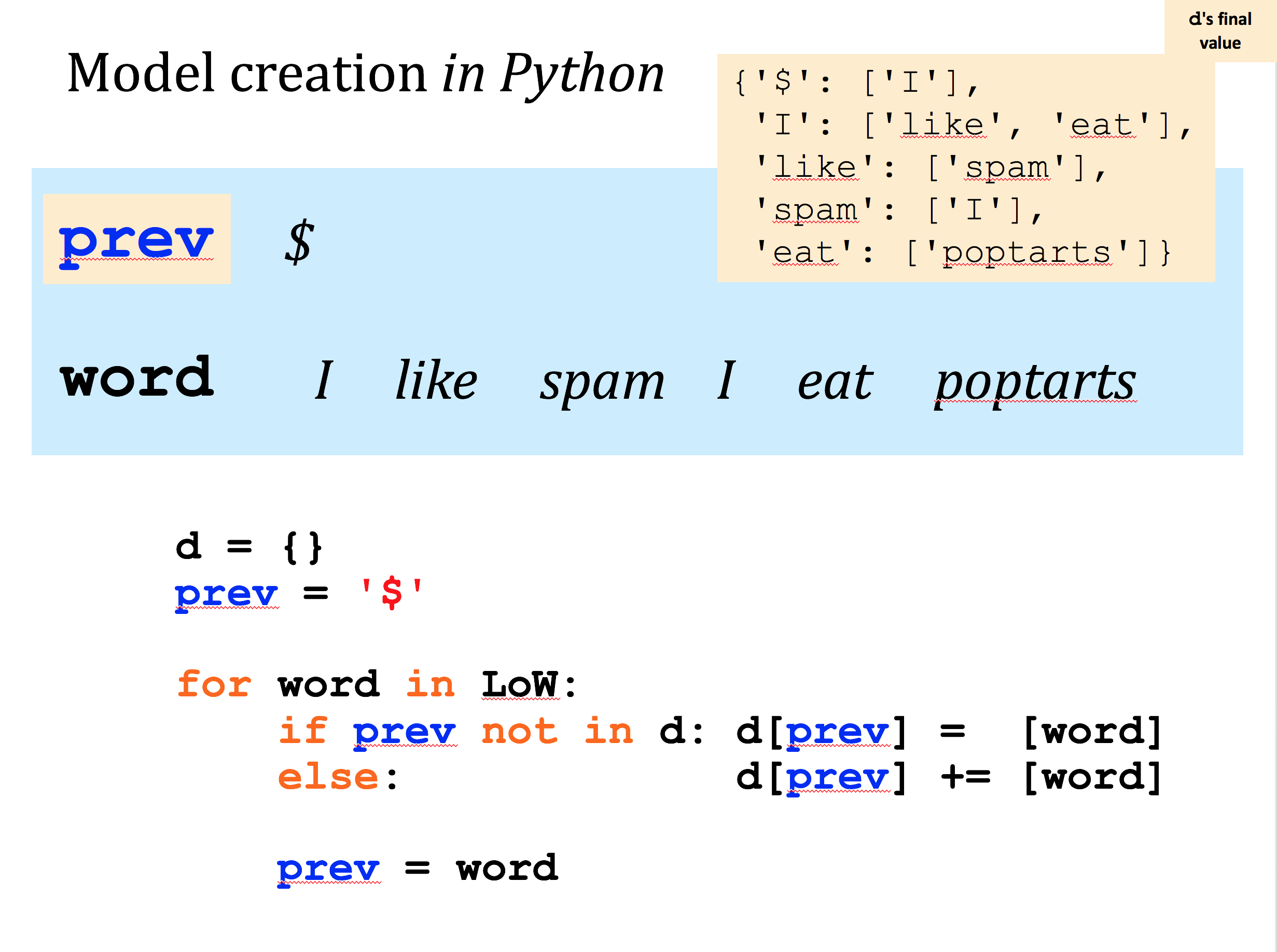
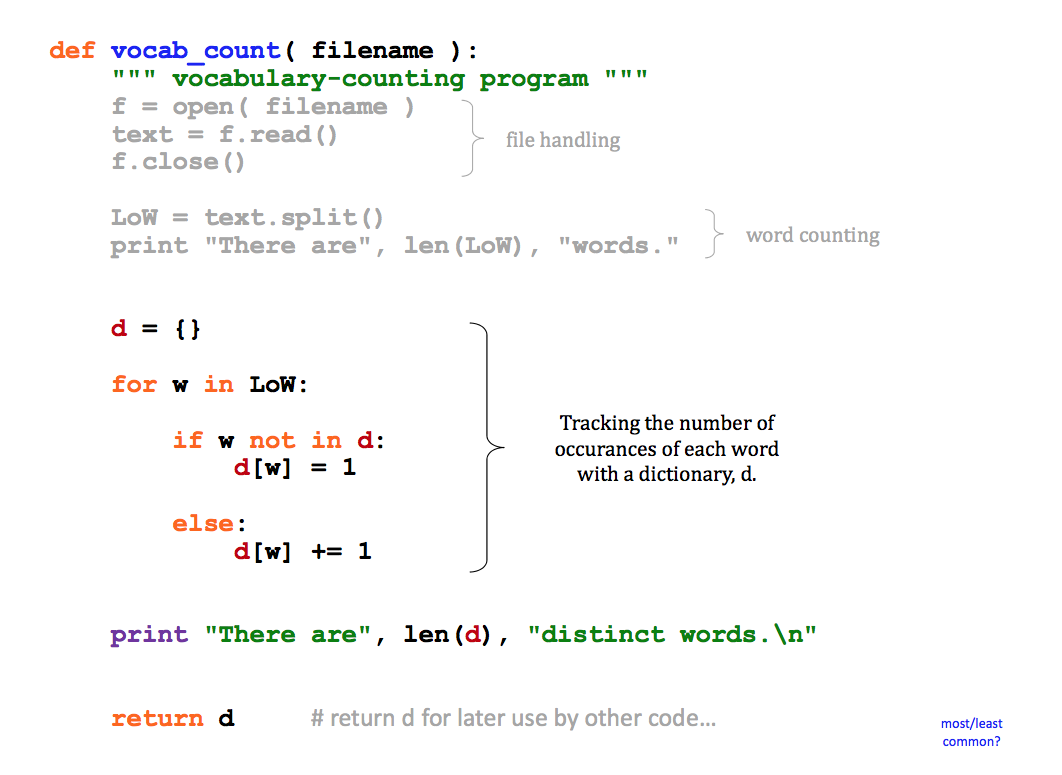
The one thing not included in those examples is how to handle words that end in a punctuation mark. That is described above and shown below…
Checking your code…
To check your code, paste the following text into a plain-text file (for example, into a new “.txt” file window in VScode):
Save this file as t.txt in the same directory where your markov.py lives. Then, see if your dictionary d matches the sample below:
The elements within each list need not be in the same order, but they should appear in the quantities shown above for each of the four keys, 'A', 'C', 'B', and '$'.
Here are the contents of the poptarts file, named a.txt, from class.
You’ll want to be sure that the output dictionary from this file is the same as the one in the class notes (note that the order of the keys can vary:
Write generateText(d, n)
generateText(d, n) will take in a dictionary of word transitions d (generated in your createDictionary function, above) and a positive integer, n. Then, generateText should print a string of n words.
The first word should be randomly chosen from among those that can follow the sentence-starting string "$". Remember that random.choice will choose one item randomly from a list! The second word will be randomly chosen among the list of words that could possible follow the first, and so on. When a chosen word ends in a period ., a question mark ?, or an exclamation point !, the generateText function should detect this event and start a new sentence by again choosing a random word from among those that follow "$".
Don’t include the '$' in the output text itself—it will be a marker internal to your function.
For this problem, you should not strip the punctuation from the raw words of the text file. Leave the punctuation as it appears in the text—and when you generate words, don’t worry if your generated text does not end with legal punctuation, i.e., you might end without a period, which is ok. The text you generate won’t be perfect, but you might be surprised at how good it is!
You may assume there won’t be any isolated punctuation (or other pathological cases) in the input. It’s best to handle any unexpected cases by simply starting a new sentence. Specifically, if your process ever encounters a word that has only appeared as the last word in your training set (i.e., it does not have any words that follow it), you should simply start generating text again with the sentence-start symbol "$".
Here are two examples that use the dictionary d, from above. Yours will differ because of the randomness, but should be similar in spirit.
Assignment Extensions
If you get the above working, there are are number of exciting ways to extend this assignment.
Turn the functions you wrote into a program that prompts the user for an input file name and how many words they want to print.
The text analyzer used in the exercise above tracks every word that follows each unique word in the reference text. For each anchor word, it stores a list of all words that follow it with repeats. Thus, when we select an item randomly from that list, the probability of selecting a word that occurs more often after the anchor word is greater because it occurs more often in the list we’re selecting from. However, when using a large reference text, allowing repeats might be too space inefficient. Because every word in a text follows some other word (or the special
$symbol), the dictionary returned bycreateDictionarywill be at least as large as the reference text. Instead of storing repeats as their own element, change your implementation to store a count associated with unique words that follow each anchor word.Add explicit handling of punctuation. Like you did with the special start symbol (
$), you can have a special end symbol that represents punctuation that ends sentences. Take a look at how the current implementation handles the special start symbol. It might be a good idea to treat punctuation symbols as their own word and using another symbol like$(that is not also$) to internally represent the end of a sentence.
Some of these extensions involve changing how the text analyzer is implemented. Specifically, the dictionary returned by the text analyzer is different, so you should also update the parts of your code that use it.