Introduction to Picobot
Objectives
- Learn how to program Picobot
Background
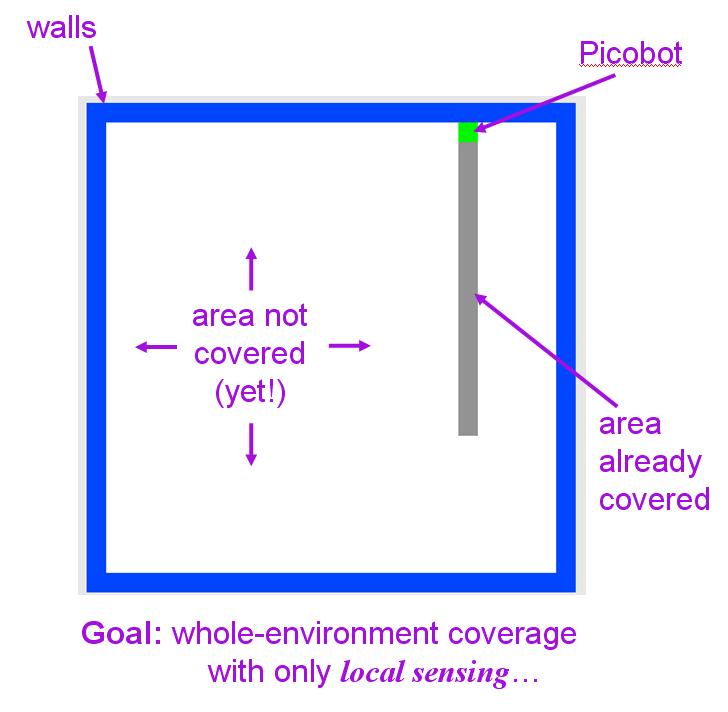
This exercise explores a simple “robot,” named “picobot,” whose goal is to completely traverse its environment.
Picobot starts at a random location in a room—you don’t have control over Picobot’s initial location. The walls of the room are blue; picobot is green, and the empty area is white. Each time picobot takes a step, it leaves a grey trail behind it. When Picobot has completely explored its environment, it stops automatically.
Surroundings
Not surprisingly, picobot has limited sensing power. It can only sense its surroundings immediately to the north, east, west, and south of it.
For example:
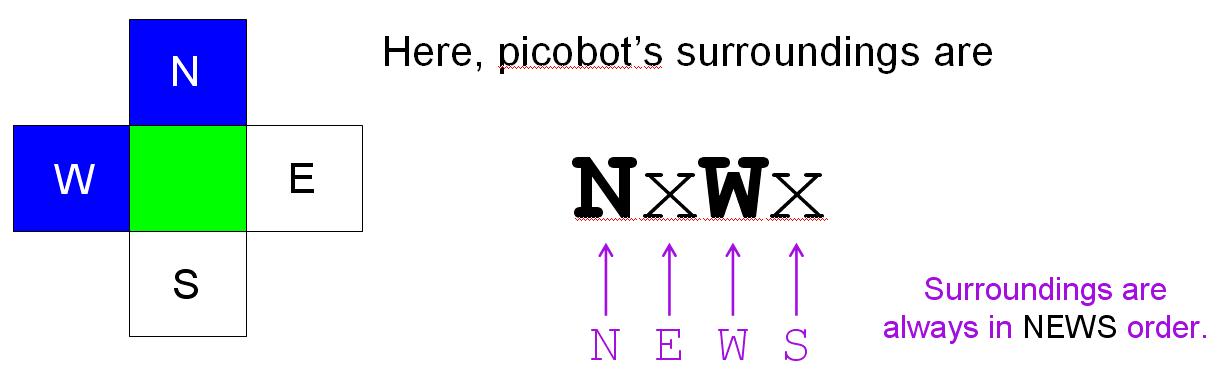
In the above image, Picobot sees a wall to the north and west and it sees nothing to the east or south. This set of surroundings would be represented as follows:
NxWx
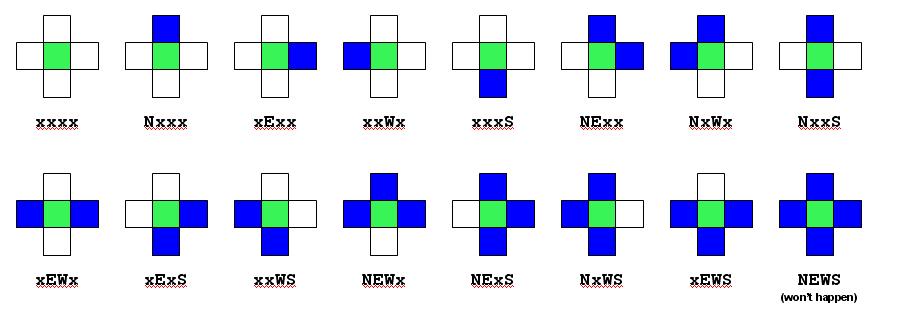
The four squares surrounding picobot are always considered in NEWS order: an x represents empty space, the appropriate direction letter (N, E, W, and S) represents a wall blocking that direction. Here are all of the possible picobot surroundings:
State
Picobot’s memory is also limited. In fact, it has only a single value from 0 to 99 available to it. This number is called picobot’s state. In general, “state” refers to the relevant context in which a computation takes place. Here, you might think of each “state” as one piece—or behavior—that the robot uses to achieve its overall goal.
Picobot always begins in state 0.
The state and the surroundings are all the information that picobot has available to make its decisions!
Rules
Picobot moves according to a set of rules of the form
StateNow Surroundings -> MoveDirection NewState
For example,
0 xxxS -> N 0
is a rule that says “if picobot starts in state 0 and sees the surroundings xxxS, it should move North and stay in state 0.”
The MoveDirection can be N, E, W, S, or X, representing the direction to move or, in the case of X, the choice not to move at all.
If this were picobot’s only rule and if picobot began (in state 0) at the bottom of an empty room, it would move up (north) one square and stay in state 0. However, picobot would not move any further, because its surroundings would have changed to xxxx, which does not match the rule above.
Wildcards
The asterisk * can be used inside surroundings to mean “I don’t care whether there is a wall or not in that position.” For example, xE** means “there is no wall North, there is a wall to the East, and there may or may not be a wall to the West or South.”
As an example, the rule
0 x*** -> N 0
is a rule that says “if picobot starts in state 0 and sees any surroundings without a wall to the North, it should move North and stay in state 0.”
If this new version (with wildcard asterisks) were picobot’s only rule and if picobot began (in state 0) at the bottom of an empty room, it would first see surroundings xxxS. These match the above rule, so picobot would move North and stay in state 0. Then its surroundings would be xxxx. These also match the above rule, so picobot would again move North and stay in state 0. In fact, this process would continue until it hit the “top” of the room, when the surroundings Nxxx no longer match the above rule.
Comments
Anything after a hash mark (#—you might think of it as a “hashtag,” computer scientists usually call it a pound sign) on a line is a comment. Comments are human-readable explanations of what is going on, but are ignored by picobot. Blank lines are ignored as well.
An example
Consider the following set of rules:
# state 0 goes N as far as possible
0 x*** -> N 0 # if there’s nothing to the N, go N
0 N*** -> X 1 # if N is blocked, switch to state 1
# state 1 goes S as far as possible
1 ***x -> S 1 # if there’s nothing to the S, go S
1 ***S -> X 0 # otherwise, switch to state 0
Recall that picobot always starts in state 0. Picobot now consults the rules from top to bottom until it finds the first rule that applies. It uses that rule to make its move and enter its next state. It then starts all over again, looking at the rules and finding the first one from the top that applies.
In this case, picobot will follow the first rule up to the “top” of its environment, moving north and staying in state 0 the whole time. Eventually, it encounters a wall to its north. At this point, the topmost rule no longer applies. However, the next rule “0 N*** -> X 1” does apply now! So, picobot uses this rule which causes it to stay put (due to the “X”) and switch to state 1. Now that it is in state 1, neither of the first two rules will apply. Picobot follows state 1’s rules, which guide it back to the “bottom” of its environment. And so it continues…
Using Picobot
Go ahead and navigate to the Picobot. Try entering the rules above, or some of your own, to get a feel for how it works. You can do this by typing rules in the Rules box and clicking the Enter rules for Picobot button. Then, hit the Go button to run the program, or click the Step button to run one rule check at a time. Note that you can click the left and right arrows around MAP to select different maps. Picobot will start with an empty map, and you will have to navigate once to the right to find the maze in the assignment below.
The exercise
For this exercise, your task is to design two different sets of picobot rules:
Problem 1: write one set of rules that will allow picobot to completely cover an empty square room.
Problem 2: write a set of rules that let’s the picobot solve the maze
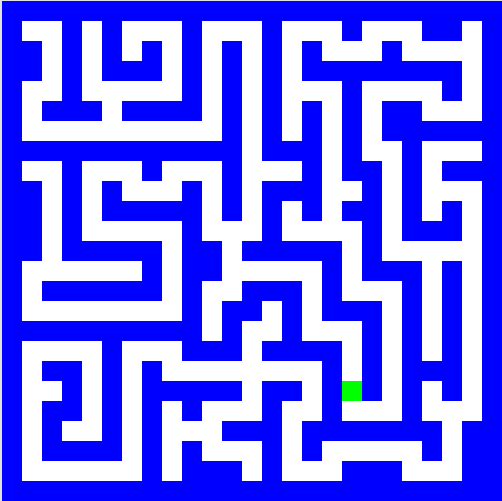
Remember to click on the “Enter rules for Picobot” before you try to run picobot.
Remember that your solutions must work from arbitrary starting positions within the environment.
Optional bonus challenge
At heart, CS fundamentally tries to answer questions of complexity: to show that problems are easier than initially thought—or, sometimes, to prove that they can’t be handled with fewer resources.
You might think about how efficient your solutions are—both in terms of the number of states used and in terms of the number of rules. There are other ways to measure efficiency as well (e.g., speed).
For a bonus challenge, try to create as efficient a solution as possible for the maze-solving set of rules. That is,
Problem 3: see if you can solve the empty room with only 6 rules
Problem 4: try to solve the maze with only 8 rules
You can also try some other Picobot challenges:
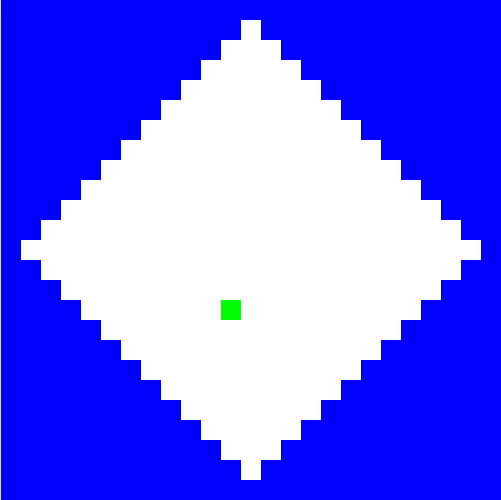
Problem 5: solving the “diamond” map that looks like this (with any number of rules)
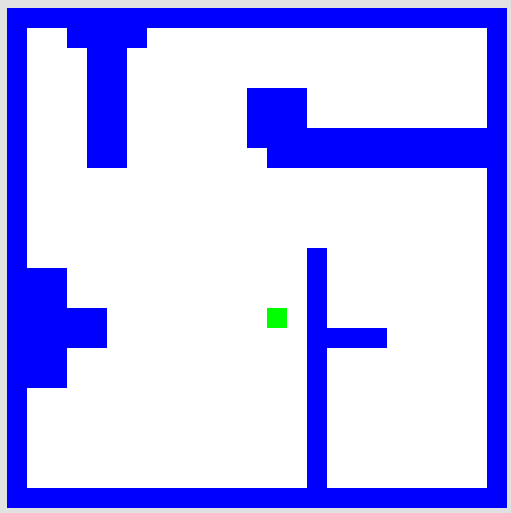
Problem 6: solving the “stalactite” map that looks like this one (with any number of rules)
You might try to solve any of these in the minimum number of rules. We know that problem 3 can be done in a minimum of 6 rules and problem 4 in a minimum of 8, but we don’t know the minimum numbers for problems 5 or 6.